
Best WiFi Routers (2026)
Quick Summary
- TP-Link AX1800 WiFi 6 Router (Archer AX21) - Ideal for budget-conscious users looking for reliable dual-band performance.
- TP-Link Deco S4 Mesh AC1900 WiFi System - Suited for larger homes needing extensive coverage with a simple setup.
- TP-Link AC1200 WiFi Router (Archer A54) - Great for users who need essential features without breaking the bank.
- TP-Link Archer BE6500 WiFi 7 Router - Best for tech-savvy customers who desire the latest technology and speed.
- NETGEAR Nighthawk Modem Router Combo (CAX30) - Perfect for users who want a combination modem and router for optimal efficiency.
- NETGEAR 4-Stream WiFi 6 Router (R6700AX) - Great for moderate internet usage without excessive investment.
- NETGEAR Nighthawk Dual-Band WiFi 7 Router (RS90) - Suitable for heavy internet users who need high-speed wireless performance.
- Amazon eero Max 7 - Excellent for those with extensive smart home setups and high bandwidth needs.
- Amazon eero Outdoor 7 - Best for outdoor setups requiring dependable coverage in large spaces.
- NETGEAR Orbi Whole Home Tri-Band WiFi 6 Mesh - Ideal for users looking for an extensive mesh network solution.
- NETGEAR Nighthawk WiFi 6 Router (RAX36) - Great for gamers needing performance and stability during online play.
- Like-New Amazon eero Pro 6E - Excellent for users wanting top performance and advanced features at a reasonable price.
How We Picked
Choosing the top WiFi routers of 2026 involved evaluating several criteria. We focused on wireless performance, the extent of coverage, ease of use, design, and price point. Notably, WiFi 6 and WiFi 7 technologies were considered for their added capabilities, including improved speeds and better handling of multiple devices. We also looked at customer reviews and market availability to ensure that the selected models meet a range of user needs.
Comparison / Decision Guide
Performance
- Look for dual-band or tri-band capabilities, as they allow more devices to connect without congestion.
- Models that support WiFi 6 or WiFi 7 provide faster speeds and improved efficiency.
When assessing performance, speed is paramount. Routers with higher Mbps can better support browsing, streaming, and gaming. Additionally, advanced features like OFDMA and MU-MIMO technology help routers send and receive data to multiple devices simultaneously, reducing lag and improving overall performance.
Durability
- Consider the build quality and whether the router can withstand regular use over time.
- Many models come with explicit warranty periods, often ranging from one to three years.
Durability is vital when investing in a router. Look for warranty options and reviews that mention longevity. Routers specifically designed for outdoor use, like the Amazon eero Outdoor 7, provide additional resistance against elements such as water and dust.
Ease of Use
- Prioritize routers with user-friendly interfaces and setup processes.
- Consider models that offer app management for increased convenience and control.
User-friendliness is vital, especially for those unfamiliar with technology. Look for routers that provide simple mobile apps or web-based dashboards to manage settings easily. Expert support and good customer service also factor heavily into ease of use.
Size/Fit
- Make sure the router can fit appropriately in your intended location; some models are bulkier than others.
- Consider whether you need a mesh system that can be spread out over larger areas.
In terms of size and fit, space may be a limiting factor. While some routers are compact and designed for easy placement on desks or shelves, mesh systems like the TP-Link Deco S4 are intended for extensive coverage across larger homes and require multiple units.
Value
- Look for routers that provide good features and performance at an accessible price.
- Balance the initial cost with long-term customer support and potential upgrades.
Value is essential when selecting a router. This means balancing features with price: often, spending a little more can yield significantly better performance and longevity. Routers priced under $100 like the TP-Link AC1200 WiFi Router still offer excellent value for many users, but investing in higher-end models can prove worthwhile for heavy users.
Best Picks
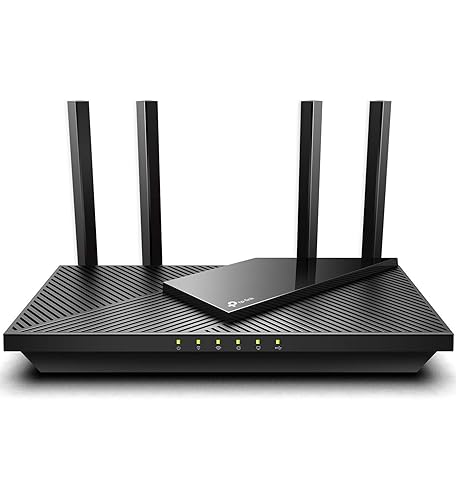
1. TP-Link AX1800 WiFi 6 Router (Archer AX21)
Best for: Budget-conscious users looking for reliability.
Consider if: You want a dual-band router without advanced features.
Skip if: You need extensive coverage or support for more than a few devices.
The TP-Link AX1800 offers a great entry point for users wanting a WiFi 6 router. It provides a substantial range and speed for standard home needs like browsing and streaming. Its easy setup and compatibility with Alexa make it a favorite among tech novices. If you don't require advanced features or extensive coverage, this cost-effective router serves as an excellent choice. With gigabit capabilities, it covers the basics effectively and efficiently—a true best-buy on a budget.
2. TP-Link Deco S4 Mesh AC1900 WiFi System
Best for: Large homes needing complete coverage.
Consider if: You prefer a simple system that replaces both a router and extender.
Skip if: You have a small space and require less coverage.
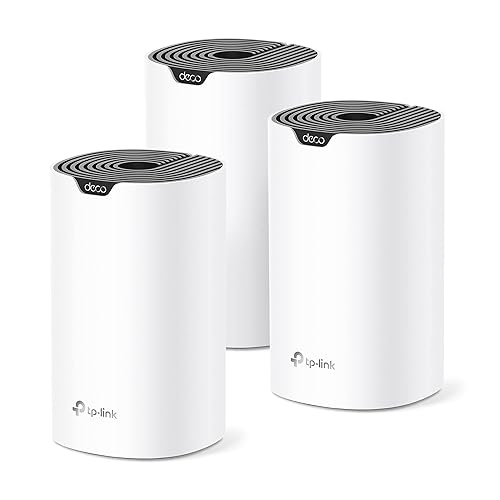
The TP-Link Deco S4 is perfect for broad spaces, ensuring that signal strength remains consistent throughout the home. As a mesh WiFi system, it eliminates dead zones, making it suitable for larger households with multiple devices. It also comes with a simple app for easy management. Given its impressive coverage of up to 5,500 sq. ft., it's a smart option for families or pet owners with various tech devices. Plus, the integration with Alexa enhances its appeal in smart homes.
3. TP-Link AC1200 WiFi Router (Archer A54)
Best for: Essential internet needs at a low price.
Consider if: You are a casual internet user without demanding requirements.
Skip if: You need high-speed connectivity for gaming or heavy streaming.
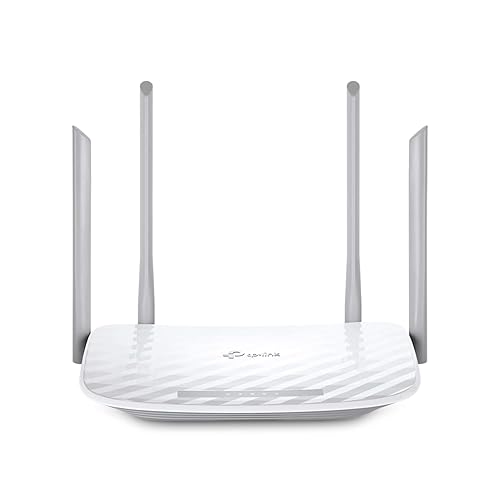
The TP-Link AC1200 presents a reliable option for casual users who primarily browse the web and stream videos. Despite its basic design, it still includes key features like parental controls and guest WiFi access, catering to various user needs. The Archer A54 ensures stable performance primarily in small to medium homes. While less powerful than WiFi 6 options, it remains an efficient choice for everyday tasks.
4. TP-Link Archer BE6500 Dual-Band Wi-Fi 7 Router
Best for: Tech-savvy customers seeking cutting-edge speed and capability.
Consider if: You run multiple high-bandwidth devices simultaneously.
Skip if: You want a basic model without the latest technology.
The TP-Link Archer BE6500 router is at the forefront due to its Wi-Fi 7 technology, supporting dual 2.5 Gbps ports and high-speed connectivity for up to 90 devices. Its quad-core CPU ensures that performance is not sacrificed, even with heavy traffic. Built with smart home users in mind, this model also integrates with various services for streamlined control. This unit represents a future-proof investment for users seeking premium performance and speed.

5. NETGEAR Nighthawk Modem Router Combo (CAX30)
Best for: Users desiring an all-in-one solution for internet connectivity.
Consider if: You have subscription plans that require advanced compatibility.
Skip if: You already own a separate modem.
The NETGEAR Nighthawk CAX30 stands out as a powerful modem-router combo supporting DOCSIS 3.1 for high-speed internet. This unit effectively frees up space and simplifies setup, consolidating your internet solution. With a sleek design and good performance ratings, it's suitable for bandwidth-heavy tasks, supporting many devices without a hitch. However, those who already possess a capable modem may find it redundant.

Who Should Buy What
Customers can choose based on specific needs:
- Budget Users: The TP-Link AC1200 provides essential features at an excellent price.
- Midrange Needs: The TP-Link AX1800 or TP-Link Deco S4 Meshed are suitable for everyday users with moderate demands.
- Premium Users: Tech enthusiasts should consider the TP-Link Archer BE6500 for advanced performance.
- Small Spaces: Those in tight areas will benefit from compact models like the Archer A54 or the NETGEAR R6700AX.
- Outdoor Setup: The Amazon eero Outdoor 7 offers unbeatable range for exterior coverage in substantial areas.
FAQs
1. What is the difference between WiFi 6 and WiFi 7?
WiFi 6 focuses on improving speed and capacity, making it ideal for homes with many devices. WiFi 7 enhances this further, offering faster speeds, reduced latency, and better performance in crowded environments.
2. How do I determine the right router for my home?
Consider your internet usage, size of home, number of devices, and whether you require advanced features like parental controls or mesh support. Grouping these factors will guide your decision.
3. What does 'mesh' mean in WiFi systems?
Mesh systems consist of multiple nodes that work together to cover larger areas without dead zones. They create a unified network that ensures better connectivity throughout your home.
4. Are expensive routers worth the investment?
Higher-priced models usually feature advanced technology that can handle greater demand and multiple connections more efficiently. They may offer better performance and durability.
5. Can I use a router with my existing modem?
Yes, most routers can function alongside existing modems, allowing you to enhance internet performance. Ensure compatibility with your modem model before purchasing.
6. How often should I upgrade my router?
Consider upgrading approximately every three to five years, especially if your network needs change or you experience persistent performance issues.
7. Do routers work with all internet service providers?
Not all routers are compatible with every ISP, so check compatibility with your service provider. Generally, DSL, cable, and fiber routers are available for specific service types.
8. How can I improve my WiFi coverage?
To enhance WiFi coverage, position your router centrally in your home, avoid obstacles, and consider a mesh system if you experience consistent dead zones.
Final Recommendation + Quick Checklist
Choosing the best WiFi router boils down to understanding your needs. If stuck, assess your primary internet activities:
- For basic browsing, a budget model like the TP-Link AC1200 suffices.
- For extensive coverage in large homes, look to mesh systems like the TP-Link Deco S4.
- For high-speed gaming and performance, consider the TP-Link Archer BE6500.
- Combining router and modem functionality? The NETGEAR Nighthawk CAX30 is a strong choice.