
External SSDs for Dorm Rooms Buying Guide
Quick Summary
- Crucial X10 1TB: High-speed storage, perfect for gamers.
View details

- XNDUATANG 1TB: Budget-friendly and fast, ideal for students.
View details
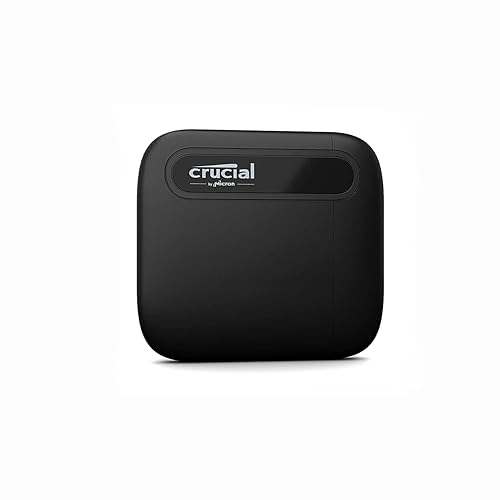
- Crucial X6 1TB: Compact and reliable, great for backups.
View details
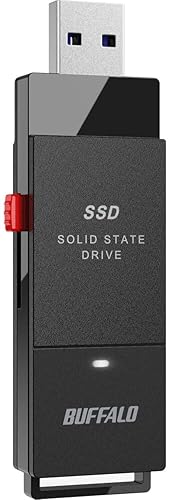
- BUFFALO External SSD: Versatile compatibility for all devices.
View details
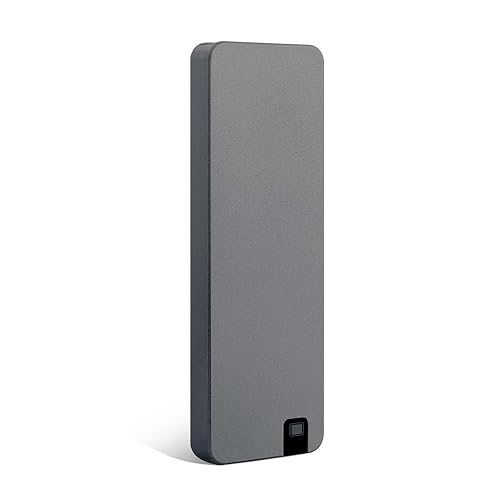
- SSK 1TB USB Drive: Dual-port design for added functionality.
View details

How We Picked
When selecting the best external SSDs for dorm rooms, we reviewed various key criteria, including speed, capacity, durability, price, and compatibility with multiple devices. We prioritized products that offer a good balance of performance and value, ensuring that students can efficiently store and access their essential files, applications, and games.
Buying Guide / Decision Criteria
Speed Capabilities
- Transfer Rates: Look for SSDs with high read and write speeds, preferably over 500MB/s. This is crucial for tasks that involve large files, such as video editing and gaming.
- Interface Types: Opt for drives that use USB 3.2 or higher to ensure maximum data transfer speeds.
Storage Capacity
- 1TB vs. 2TB Options: Depending on your storage needs, you may want to choose a 1TB drive, which is typically sufficient for most students, or consider 2TB if you plan on storing large files such as games or videos.
- Future Needs: Consider future storage needs and whether you might need more capacity in a year or two.
Durability and Portability
- Build Quality: Look for SSDs with rugged designs, especially if they will be transported frequently in a backpack.
- Size and Weight: A lightweight, compact SSD is essential for dorm life where space is often limited.
Compatibility
- Multiple Devices: Choose SSDs that support a wide range of devices, including Windows, Mac, and gaming consoles like PS5 and Xbox.
- Connection Ports: Look for SSDs that offer both USB-C and USB-A connections for flexibility with older and newer devices.
Ranked Picks
1. Crucial X10 1TB Portable SSD
- Best for: High-speed data transfer, gamers, and multimedia storage.
- Consider if: You need rugged build quality and cross-device compatibility.
The Crucial X10 1TB Portable SSD is a standout choice for anyone looking for speed and reliability. With read speeds of up to 2,100MB/s, this SSD can handle large files, making it perfect for gamers and students who need to quickly transfer data. Its durable design ensures it can withstand the rigors of dorm life, whether bouncing around in a backpack or sitting on a desk. The compatibility with Windows, Mac, and Android devices means that you won't have to worry about whether it will work with your current setup. View details
2. XNDUATANG 1TB Portable SSD
- Best for: Budget-conscious students and casual users.
- Consider if: You need a solid entry-level SSD without breaking the bank.
If you're on a budget but still want decent performance, the XNDUATANG 1TB Portable SSD is an excellent pick. It offers speeds of up to 500MB/s, which is sufficient for storing files, photos, and even some games. Its compact and lightweight design makes it easy to carry around, perfect for dorm use. Given its price point, it's an engaging option for students who might not need the fastest speeds but still require reliable storage. The versatility of compatibility means it works well with various devices, including PCs, Macs, PlayStation, and Xbox. View details
3. Crucial X6 1TB Portable SSD
- Best for: General use for students needing reliable backups.
- Consider if: You prefer a compact design and mid-range pricing.
The Crucial X6 Portable SSD provides a great balance of performance, size, and cost. With speeds of up to 800MB/s, it supports a range of applications, from backing up schoolwork to transferring game files. Its lightweight build ensures it's easy to take to class or while traveling for breaks. This SSD is particularly beneficial for students looking for an extra layer of security for their important files, making backups easy and efficient. It's compatible with a variety of devices, ensuring you won't run into connectivity issues regardless of your tech setup. View details
4. BUFFALO External SSD 1TB
- Best for: Versatile performance across multiple devices.
- Consider if: You want great speed without high pricing.
Constructed for versatility, the BUFFALO External SSD delivers reliable performance at speeds of up to 600MB/s. Its design allows seamless compatibility across various platforms, including PS4/PS5, Windows, and Mac systems, ensuring you get the most out of your investment. Ideal for students who are gamers or multimedia users, this SSD plays a crucial role in efficient data management while providing essential speed for quick file access and game loading. It's a dependable choice that balances performance needs with price, making it a go-to for many dorm users. View details
5. SSK 1TB USB Drive
- Best for: Users needing dual-port functionality for various connections.
- Consider if: You value a balance between price and speed in a compact format.
The SSK 1TB USB Drive stands out thanks to its dual-port feature, allowing connections to both Type-C and Type-A devices. This flexibility is crucial for students juggling multiple devices, and its 550MB/s speed is commendable for general file storage and media viewing. The compact design is perfect for dorm life, ensuring that students can easily store and carry essential files without taking up much space. This SSD is a great fit for tech-savvy users who might need to swap files with various devices, making it a solid investment for those in shared living environments. View details
Who Should Buy What
- Budget Users: If you're seeking affordability, look for options like the XNDUATANG 1TB, which balances cost and performance.
- Mid-Range Needs: Consider Crucial X6 or BUFFALO SSD for performance that won't strain your wallet.
- Power Users: Crucial X10 is the best choice for gamers or media students needing top speeds.
- Compact Spaces: For small dorm rooms, any of the compact models such as the XNDUATANG offer great performance without extra bulk.
FAQs
- What is the difference between an SSD and an HDD? SSDs are faster, more durable, and have no moving parts compared to traditional Hard Disk Drives (HDDs), which use spinning disks. This makes SSDs ideal for quick data access and reliability.
- How do I choose the right SSD size? Consider your storage needs; 1TB is typically sufficient for general users, while 2TB or more may be necessary for gamers or those storing large files.
- Can I use an external SSD with my gaming console? Yes, most modern gaming consoles, including PS4/PS5 and Xbox, support external SSD connections to expand storage seamlessly.
- Are external SSDs safe for storing sensitive information? Yes, SSDs offer encryption features, making them secure for sensitive data. Always check compatibility with encryption software if needed.
- Do I need special software for SSDs? Generally, no; SSDs can be directly used as storage drives, but some brands offer additional software for management or data recovery.
- How do I maintain my external SSD for longevity? Avoid exposing it to extreme temperatures and moisture, and regularly back up data as precaution.
- How fast is a typical external SSD? Speeds vary; some models offer around 500MB/s, while high-end SSDs can go up to 2,100MB/s, significantly impacting file transfer times.
- What is the average lifespan of an external SSD? Generally, an SSD can last several years, often exceeding 5–10 years based on usage and quality, although factors like write cycles may affect longevity.
Final Recommendation + Checklist
When selecting an external SSD for your dorm room, focus on storage needs, speed requirements, and budget. Start by identifying your primary use case: gaming, file storage, or backup. Check for durability and compatibility, considering the devices you'll connect to the SSD. We recommend prioritizing SSDs that offer at least USB 3.2 connectivity for optimal speeds. The following checklist can help you finalize your decision:
- Determine storage capacity (1TB vs. 2TB).
- Assess your budget and performance needs.
- Check compatibility with all your devices.
- Look for durability and portability features.
- Read user reviews and ratings for reliability insights.
Choosing the right external SSD for dorm life can make your academic experience smoother and more productive. Consider all aspects carefully and make an informed decision.