
Best WiFi Routers for Small Apartments
Quick Summary
-
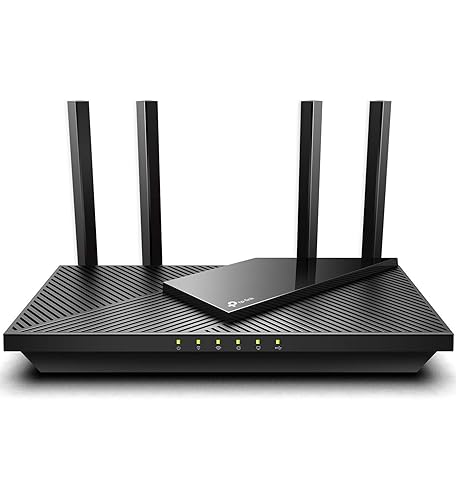
TP-Link AX1800 WiFi 6 Router (Archer AX21) - $52.21
-
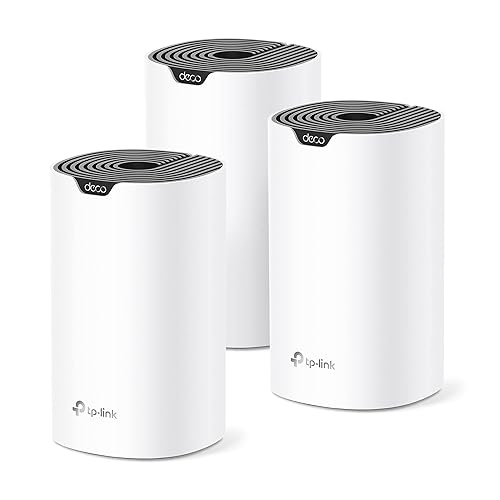
TP-Link Deco S4 Mesh AC1900 WiFi System - $99.00
-
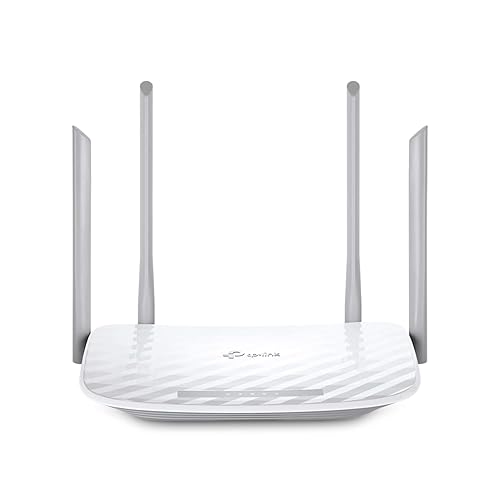
TP-Link AC1200 WiFi Router (Archer A54) - $28.98
-
TP-Link Archer BE6500 Dual-Band Wi-Fi 7 Router - $149.99

-
NETGEAR Nighthawk Modem Router Combo (CAX30) - $259.51

-
NETGEAR 4-Stream WiFi 6 Router (R6700AX) - $69.99

-
NETGEAR Nighthawk Dual-Band WiFi 7 Router (RS90) - $99.99

-
Amazon eero Max 7 mesh wifi router - $599.99

How We Picked
In choosing the best WiFi routers for small apartments, we considered various critical factors that directly impact user experience, performance, and value. Our evaluation process includes:
- Coverage Area: Given the limited space in small apartments, the ability of a router to deliver strong signals to all corners is crucial.
- Speed & Performance: Routers must support high-speed internet for streaming, gaming, and working from home.
- Number of Connections: The capability to connect multiple devices smoothly is essential, especially in households with diverse technology needs.
- User-Friendly Features: Ease of setup, interface design, and helpful features like parental controls or guest networks enhance usability.
- Value for Money: Products were assessed based on their price relative to the features and performance they offer.
Buying Guide / Decision Criteria
Coverage Area
The coverage area of a router is vital, especially in small apartments where walls and furniture can obstruct signals. Look for routers that can effectively cover a minimum of 1,500 square feet, which is typical for smaller living spaces. Mesh systems like those from TP-Link offer flexibility in covering larger areas and removing dead spots.
Speed & Performance
Consider the internet speed of your plan; your router should be able to handle it seamlessly. Opt for WiFi 6 routers which provide faster speeds and support for more devices without compromising performance. For instance, routers like the TP-Link AX1800 and NETGEAR Nighthawk provide advanced speed capabilities suited for gaming and 4K streaming.
Connectivity Options
Evaluate the number of Ethernet ports and the capability to connect wirelessly. High-quality routers often support simultaneous connections on multiple devices, ensuring that you won't experience lag during peak usage times, especially if others are streaming or gaming simultaneously.
User-Friendly Features
Prioritize routers with easy installation and intuitive interfaces. Features such as mobile app controls, security measures, and guest access options add value. Devices that integrate seamlessly with home assistants like Alexa can greatly enhance convenience.
Design and Size
In small apartments, aesthetic and physical space matter. Sleek designs can blend into your home's decor better, and compact sizes help avoid clutter. Check whether a router can be wall-mounted or placed in a discreet spot.
Value for Money
Assess the feature set against the price. A higher price tag doesn't always mean better performance or features. Focus on what suits your needs and gives you the best overall experience without unnecessary extras.
Ranked Picks
1. TP-Link AX1800 WiFi 6 Router (Archer AX21)
- Best for: Budget-conscious users wanting high performance.
- Consider if: You have moderate internet usage like streaming and browsing.
The TP-Link AX1800 WiFi 6 Router (Archer AX21) stands out for its excellent combination of performance and affordability. It delivers dual-band speeds up to 1800Mbps, sufficient for most streaming needs without lag. The router covers an area suitable for small apartments, enabling stable connections for multiple devices. Its easy mesh capabilities allow you to expand your network efficiently if needed. Compact and straightforward to set up, it's ideal for users who may not be tech-savvy. Additionally, it supports Alexa, adding an extra convenience element. Overall, this router offers a fantastic balance of cost and performance, making it an excellent choice for smaller homes. View details
2. TP-Link Deco S4 Mesh AC1900 WiFi System
- Best for: Larger small apartments or homes with multiple rooms.
- Consider if: You want seamless coverage free from dead zones.
If you're living in a slightly larger space or are looking for enhanced coverage, the TP-Link Deco S4 Mesh AC1900 WiFi System is ideal. This 3-pack system can cover up to 5,500 sq. ft., effectively eliminating dead zones and allowing for continuous signals regardless of where you are in the apartment. Each unit integrates with Alexa for voice command features, plus hardware that provides quick setup via the app. Additionally, it supports multiple devices, making it excellent for households with smart gadgets. With features that keep security and performance in check, this router system ensures an effortless browsing experience in every corner of your apartment. View details
3. TP-Link AC1200 WiFi Router (Archer A54)
- Best for: Basic users needing reliable internet connectivity.
- Consider if: You have limited devices and light internet usage.
The TP-Link AC1200 WiFi Router (Archer A54) is perfect for basic internet users who require a reliable connection without extravagance. Capable of delivering dual-band speeds up to 1200 Mbps, it suits moderate activities like browsing and streaming on one or two devices simultaneously. It features four Ethernet ports, which can directly connect devices for optimal performance. EasyMesh compatibility ensures that you can create a broader network through additional units if desired. This device appeals to those looking for budget-friendly solutions without sacrificing quality entirely. It's also easy to set up and customize based on personal preferences. View details
4. TP-Link Archer BE6500 Dual-Band Wi-Fi 7 Router
- Best for: Users with high-demand applications like streaming and gaming.
- Consider if: You frequently connect numerous devices.
The TP-Link Archer BE6500 represents cutting-edge technology with Wi-Fi 7 capabilities. This router offers substantial speed, covering extensive areas and allowing multiple device connections seamlessly. With speeds up to 2.5 Gbps, it is perfect for gamers and streamers who engage in high-demand tasks without interruptions. The dual 2.5 Gbps ports enhance wired connections, making it a great choice for smart TVs and gaming consoles. Design-wise, it fits well in small spaces, maintaining user convenience with its sleek look. Aimed at tech-savvy users, this router promises to keep up with advancing internet standards, ensuring a future-proof option. View details
5. NETGEAR Nighthawk Modem Router Combo (CAX30)
- Best for: Users wanting an all-in-one solution.
- Consider if: You prefer the convenience of fewer devices.
The NETGEAR Nighthawk Modem Router Combo (CAX30) serves as an integrated solution for those looking to simplify their setup while maintaining high performance. This combo unit supports DOCSIS 3.1 technology, allowing for extreme broadband speeds alongside WiFi 6 features. Its robust performance allows streaming on multiple devices at once without any significant slowdown. Ideal for small apartment setups where space is limited, it combines both modem and router in one device. Users should consider this if they want to reduce clutter while maintaining a powerful, high-speed internet connection. View details
Who Should Buy What
Choosing the right WiFi router involves evaluating specific needs. Here's a breakdown to help you decide:
- Budget: Go for the TP-Link AC1200 WiFi Router (Archer A54) if you want solid performance for basic needs.
- Midrange: Consider the TP-Link AX1800 WiFi 6 Router (Archer AX21) for a balance of performance and modern features.
- Premium: The TP-Link Archer BE6500 Dual-Band Wi-Fi 7 Router is suitable for high-demand users who want the latest technology.
- Small Spaces: Use the TP-Link Deco S4 Mesh AC1900 WiFi System for dead-zone coverage.
- Power Users: The NETGEAR Nighthawk Modem Router Combo (CAX30) is perfect for users needing an all-in-one solution.
FAQs
- What factors should I consider when selecting a WiFi router?
Consider coverage area, speed, performance capabilities, the number of devices it can support, and user-friendly features like app management and parental controls. - What is the best WiFi standard for small apartments?
WiFi 6 is recommended due to its improved speed and efficiency, especially in environments with many connected devices. - Are mesh systems worth it?
Yes, if you have a large apartment or face issues with signal dead zones. Mesh systems provide better coverage compared to traditional routers. - How do I know if I need a dual-band or tri-band router?
Dual-band routers suffice for most, while tri-band routers benefit users with numerous devices or heavy usage scenarios. - Can I install my router myself?
Most of the listed routers come with a user-friendly setup. Many feature mobile apps making installation and management easy for non-technical users. - What is the difference between a modem and a router?
A modem connects your home to the internet, while a router creates a local network to connect your devices together. - Do all routers support gigabit speeds?
No, gigabit speeds are typically supported by routers rated for at least WiFi 5. Always check specifications for maximum speed capability. - How can I improve my WiFi signal?
Position your router in an open, central location away from obstacles, and avoid interference from appliances like microwaves and cordless phones.
Final Recommendation + Checklist
For small apartments, a router that effectively balances speed, coverage, and compatibility with multiple devices is crucial. Choose based on your specific needs and budget with these considerations:
- Assess the size of your living space and connectivity needs.
- Check if the router supports the latest WiFi standards to future-proof your purchase.
- Consider potential expansion with mesh networking systems if necessary.
- Review product features, including safety protocols, ease of use, and customer service options.
Ultimately, whether selecting a budget-friendly option like the TP-Link AC1200 WiFi Router (Archer A54) or a high-level solution such as the Amazon eero Max 7, ensuring the router meets your personal lifestyle and internet usage is essential for a satisfying experience.